Migrating a qmail server
June 30, 2025 by Roberto Puzzanghera 0 comments
- update_zones.sh (quickly updates zones' IP, serials, TTL)
Background
- A mail server based on
qmail/vpopmailwhich also holds a primary DNS server for the domains (yes, I know that it is not good to have the primary DNS and the mail server on the same server/IP, but I only have one IP). - Both of them must be migrated to a new server with a different IP address and hardware.
- The new and the old servers are connected via Internet (
ssh).
Converting a Linux installation to a Slackware one in an OVHcloud server
June 17, 2025 by Roberto Puzzanghera 0 comments
This article explains how to convert a given Linux distribution to a Slackware one in an OVHcloud server. I wrote in the past an article about doing the same for OVH kimsufi.
It is inspired by the Slackware wiki page Install Slackware on an online.net Dedibox BareMetal Server, which explains the same for a Dedibox BareMetal Server on online.net.
The plan is to
- install a
Linuxof your choice - reboot in rescue mode that
Linuxdistro - download the
Slackwareinitrd and prepare the install environment - download the set of
Slackwarepackages to be installed - chroot into the
Slackwareinitrd image - partition and install
Slackwareover the existingLinux - configure the fresh installed
Slackwareand reboot
Limiting the number of emails sent by a given auth-user/domain/IP
June 14, 2025 by Roberto Puzzanghera 21 comments
If you followed the 'quick configuration' based on the config-all script, this feature was already configured for you at that time with the default settings.
Changelog
- Jun 14, 2025
- Added a cronjob for rcptcheck-overlimit that only removes cases that didn't exceed the limit, i.e. enforces a permanent ban (tx Andreas Gerstlauer)
If you want to avoid the risk of compromising your server because of accounts who are sending messages indiscriminately to the world, due to the fact that their password have been violated in some way, then you can consider Luca Franceschini's rcptcheck-overlimit script, which has to be used in conjunction with the rcptcheck patch (a patch derived by Luca himself from an original work of Jay Soffian).
Upgrading qmail
June 9, 2025 by Roberto Puzzanghera 576 comments
- Latest version 2025.06.09 (github)
- Changelog
- Readme
For my convenience I moved the qmail sources to my github space. Nonetheless, all information about qmail and related programs will continue to be posted in this web space, and this pages remain the place to eventually seek support. From now on, instead of releasing a combined patch for qmail, I'll release a package which is the result of the ancient netqmail-1.06 plus my modifications. The original patches that I accomodated in my qmail package are listed below.
Changelog
- Jun 09, 2025
- CRLF fix for fastremote-3 patch (thanks Andreas Gerstlauer)
- Bug fix to the greetdelay program (thanks Andreas Gerstlauer): qmail-smtpd crashes if SMTPD_GREETDELAY is defined with no DROP_PRE_GREET defined.
- turned off TLS and helo dns check on qmail-smtpsd/run script (tx Luis) - Apr 30, 2025
qmailctlqmHandle,queue_repairand all scripts installed in QMAIL/bin and not in /usr/local/bin byconfig-all.sh - Apr 25, 2025
- added a configuration script config-all, which configure and installs the control files (as per the original config-fast script), aliases, SRS (uses control/me as the srs_domain), log dirs in /var/log/qmail, tcprules (basic, just to make initial tests), supervise scripts,qmailctlscript, DKIM control/filterargs and control/domainkeys dir, SURBL,smtpplugins,helodnscheckspp plugin,svtools,qmHandle,queue-repair, SSL key file (optional).
Consider this feature as "testing" - Feb 11, 2025
- Several adjustments to get freeBSD and netBSD compatibility. More info in the commit history. Hints/comments are welcome.
- freeBSD users have to leave the very 1st line of the file "conf-lib" blank, as libresolv.so is not needed on freeBSD.
- Dropped files install-big.c, idedit.c and BIN.* files.
- Dropped files byte_diff.c, str_cpy.c, str_diff.c, str_diffn.c and str_len.c, which break compilation on clang and can be replaced by the functions shipped by the compiler (tx notqmail).
- Old documentation moved to the "doc" dir. install.c and hier.c modified accordingly
- conf-cc and conf-ld now have -L/usr/local/lib and -I/usr/local/include to look for srs2 library
- conf-cc and conf-ld now have -L/usr/pkg/lib and -I/usr/pkg/include to satisfy netBSD
- vpopmail-dir.sh: minor correction to vpopmail dir existence check
- srs.c: #include <srs2.h> now without path - Dec 01, 2024 (More info here and in the github release notes)
- Added support for EAI (RFC 5336 SMTP Email Address Internationalization) (#13). Thanks to https://github.com/arnt/qmail-smtputf8/tree/smtputf8-tls. libidn2 package (libidn2-dev on debian) is a new dependence.
- chkuser is now smtputf8 compliant. It accepts utf8 characters in sender and recipient addresses provided that the remote server advertises the SMTPUTF8 verb in MAIL FROM, otherwise it allows only ASCII characters plus additional chars from the CHKUSER_ALLOWED_CHARS set.
* dropped variables CHKUSER_ALLOW_SENDER_CHAR_xx CHKUSER_ALLOW_RCPT_CHAR_xx (replaced by CHKUSER_ALLOWED_CHARS)
* dropped variables CHKUSER_ALLOW_SENDER_SRS and CHKUSER_ALLOW_RCPT_SRS, as we are always accepting '+' and '#' characters
* added variables CHKUSER_INVALID_UTF8_CHARS and CHKUSER_ALLOWED_CHARS - Oct 26, 2024
- qmail-remote.c patched to dinamically touch control/notlshosts/<fqdn> if control/notlshosts_auto contains any number greater than 0 in order to skip the TLS connection for remote servers with an obsolete TLS version. (tx Alexandre Fonceca) (commit)
- defined CHKUSER_DISABLE_VARIABLE "RELAYCLIENT" in chkuser_settings.h
- enabled CHKUSER_SENDER_NOCHECK_VARIABLE "RELAYCLIENT" in chkuser_settings.h
- fixed several compilation breaks/warnings on later gcc compilers (tx Pablo Murillo)
- invalid auth fix in qmail-smtpd.c's smtp_auth function (tx Alexandre Fonceca for the advice) (commit)
- qmail path determined dinamically in conf-policy - Jan 11, 2024
- DKIM: dk-filter dropped
WARNING: IF YOU ARE UPGRADINGqmailAND YOU ARE USING A VERSION BEFORE 2024.01.11, YOU HAVE TO RECONFIGURE DKIM AND MODIFY YOURrcFILE ACCORDINGLY.
Installing a Let's Encrypt certificate for your qmail, dovecot and apache servers
June 6, 2025 by Roberto Puzzanghera 28 comments
Changelog
- Jun 6, 2025
-dehydratednow launches a hook.sh script which handles the post-installation tasks (assemble and copy the certificate into theqmaildir, restart the server and eventually alert the administrator in case of problems). It replaces the old scripts. - Feb 22, 2025
- Let’s Encrypt have announced that they will end their free alerting service. Added a script to achieve the same internally. - Aug 6, 2023
- The certificates installation is now based ondehydrated.The previous documentation based oncertbotwill be left as is at the bottom of this page, but it won't be updated anymore. - May 18, 2023
- added the option--key-type rsato thecertbotcommand, to avoid thatcertbotwill silently default toECDSAthe private key format, which results not understandable by myopenssl-1.1. In this way the format of the private key will beRSA. More info here.
Roundcube webmail
June 2, 2025 by Roberto Puzzanghera 16 comments
- Info: https://roundcube.net
- Version: 1.6.11
Roundcube is a full featured webmail with a nice interface.
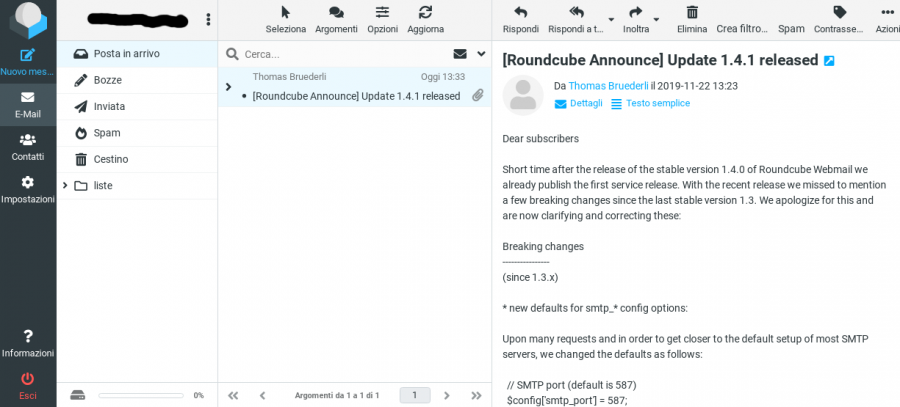
Changelog
- Jun 2, 2025
version 1.6.11 - Mar 9, 2025
added$config['quota_zero_as_unlimited'] = true;to show quota unlimited instead of unknown for accounts with unlimited quota
Read the release note at https://github.com/roundcube/roundcubemail/blob/master/CHANGELOG.md for more info.
Installing and configuring SpamAssassin
May 31, 2025 by Roberto Puzzanghera 62 comments
- Info: http://spamassassin.apache.org/
- Docs: http://spamassassin.apache.org/full/4.0.x/doc/
- Latest version: 4.0.1
- Download: http://spamassassin.apache.org/downloads.cgi
SpamAssassin is a mature, widely-deployed open source project that serves as a mail filter to identify Spam. SpamAssassin uses a variety of mechanisms including header and text analysis, Bayesian filtering, DNS blocklists, and collaborative filtering databases. SpamAssassin runs on a server, and filters spam before it reaches your mailbox.
Troubles with latest DBI::mysql module
Days ago (Jan 06, 2025) the perl DBI::mysql module has been updated to v4.053 and v5.011. Both of them dropped the support for MariaDB and MySQL > 8. Infact v4.053 compilation exits with
/usr/bin/perl: symbol lookup error: /usr/local/lib64/perl5/auto/DBD/mysql/mysql.so: undefined symbol: mysql_real_escape_string_quote
while v5.011 doesn't compile as it seems not to be compliant with my openssl-1.1.1zb (I had the same issue on other distros with openssl-1.1 installed).
I'm restoring v4.052 like this
cpan install DVEEDEN/DBD-mysql-4.052.tar.gz
Configuring qmail
April 18, 2025 by Roberto Puzzanghera 109 comments
- More info on Life with qmail
- README.vdelivermail
qmail v2025.04.18 and later include a new config-all script to automate the qmail core configuration. Several scripts are now embedded in qmail and automatically installed if one simply run './config-all mx.domain.tld' after the compilation. This is what will be installed and configured by the quick installation:
- main control files as per original
config-fastscript, - aliases,
- RBL
- SPF
- SRS (uses control/me as the srs_domain),
- log dirs in /var/log/qmail,
- cronjobs
- logrotate
- PATH and MANPATH in /etc/profile.d/qmail.sh
- tcprules (basic, just to make initial tests),
- supervise scripts,
qmailctlscript,- DKIM control/filterargs and control/domainkeys dir,
- SURBL,
- overlimit feature,
- moreipme,
- smtpplugins,
helodnscheckspp plugin,svtools,qmHandle,queue-repair,- SSL key file (optional)
From now on, running ./config-all mx.mydomain.tld after the compilation will get the qmail installation ready for testing. You'll only have to add your virtual domains and the other features not listed above.
Those who prefer to manually configure everything can stick with the original config-fast script, which now copies my supervise scripts to the qmail/doc dir.
In the following, the "Manual configuration" section is of course a suggested reading in order to have a view of how everything works, especially for newbies.
Consider this feature as testing for the time being. Feedbacks are appreciated.
Changelog
- Apr 15, 2025
- added script config-all.sh - Jul 31, 2024
- multilog uses "d" flag as default to gain compatibility with the readable datetime format of multilog in daemontools-0.78. Change it with the "t" flag if you prefer to have timestamps.